Akai RC-90 Wireless Remote
Works with the Akai reel to reel decks GX-77, GX-77BL, GX-646
and GX-747(dbx) and Akai cassette decks CS-F9, CS-F11, CS-F21, CS-F33R, CS-F36R
and CS-F39R, GX-F15, GX-F25, GX-F35, GX-F37, GX-F44R, GX-F60R, GX-F65, GX-F66R,
GX-F66RC, GX-F95 and UC-F5.
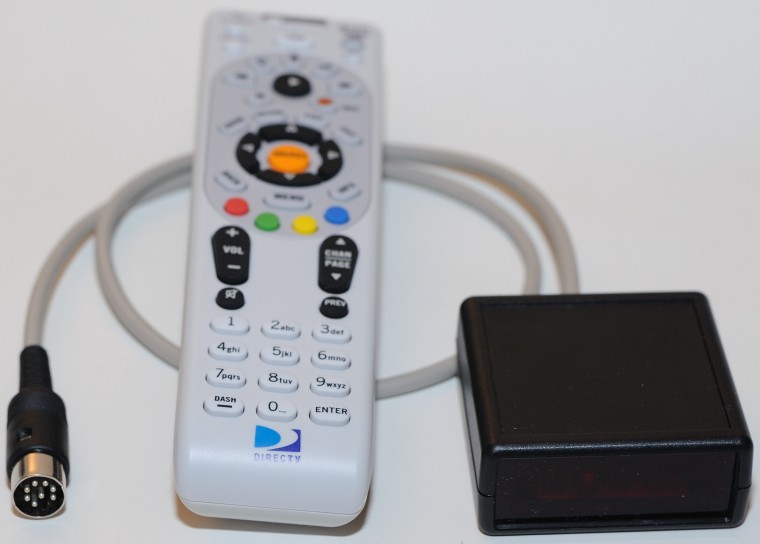
Current price for this remote receiver, universal remote and international AC adapter is $75 plus shipping of $9 within the US and $16 outside the US.
If you would rather buy through eBay I have this listed in auction number 320705114211
Contact me if you are interested. My email address is scott@revoxremotes.com
PDF of instructions Akai RC-90 Instructions
Installation: Turn off the power to the tape deck. Plug the remote adapter into the remote connector on the top or back of the tape deck. Now power can be turned back on. The light on the front of the remote adapter should be on.
The remote adapter controls the standard 6 transport functions: Play, Stop, F.F., Rewind, Record and Pause, plus Reverse Play and Record Mute if your deck has those functions. All functions can be controlled using any universal remote programmed for the proper Sony VCR code. Reverse play is controlled via the #1 button on the remote keypad. Record Mute is controlled via the #0 button on the remote keypad.
The remote adapter can be programmed to respond to Sony VHS VCR, Beta VCR, 8mm VCR and Laser Disc Player codes. To select between the four options there are two jumpers inside the unit. Remove the two screws on the bottom of the unit and remove the top cover.
Toward the front window are two jumpers labeled 1 and 2. They configure the remote device code per the table below.
|
JMP1
|
JMP2 |
Device Code |
DirecTV
|
RCA Remote |
|
JMP
|
JMP |
Beta VCR |
20033
|
VCR-119 |
|
JMP
|
OPEN
|
8mm VCR
|
20034 | VCR-098 |
|
OPEN
|
JMP
|
VHS VCR
|
20032 | VCR-099 |
|
OPEN
|
OPEN |
LDP |
---- | ---- |
JMP1 and JMP2 are JMP by default
Configuring the RCA Universal Remote
To program the RCA remote press and hold the Code Search button until the
red light comes on. Release the Code Search button and momentarily press the
VCR button then enter the 3 digit code from the table above (default is 119).
The red light should blink after each keypress and go out after the last digit
is entered. Press the VCR button and press one of the transport control buttons
(PLAY, STOP, FF, REW, REC or PAUSE). The light on the front of the remote
adapter should blink off momentarily. If the light does not blink off try
reprogramming the remote or check the state of the jumpers inside the remote
adapter. On the RCA remotes the REC button needs to be pressed twice to
activate record.
Configuring the DirecTV RC65 Universal
Remote
To program the RC65 remote first slide the switch at the top to AV1 or AV2.
Press and hold the MUTE and SELECT buttons until the green light at the top
blinks twice then release. Using the number keypad enter the 5 digit device
code from the table above. If done correctly the green light will blink twice
after the last digit is entered. On this remote Record must be pressed twice to
activate. The full manual for the DirecTV RC65 can be found here.